Headlight and vehicle lighting symbols are dashboard indicators that show the status and function of different car lights, helping drivers know which lights are active and when to use them.
From low beams and high beams to fog lights and daytime running lights, each symbol represents a specific lighting function designed for different driving conditions.
In this guide, we’ll explain the meanings of the most common car headlight symbols, how to activate them, and the right situations to use each type of vehicle lighting for safer and more confident driving.
Common Car Headlight Symbols at a Glance
Symbol | Light Type | Function |
|---|---|---|
Low Beam | Provides forward road illumination for normal night driving | |
High Beam | Delivers powerful long-distance lighting for dark roads with low visibility | |
Front Fog Lamp | Improves visibility in fog, rain, or dusty conditions by illuminating the road close ahead | |
Rear Fog Lamp | Makes the vehicle more visible to drivers behind in foggy or poor weather conditions | |
Indicator Lamp | Signals the vehicle’s turning direction to other road users | |
Parking Lights | Keeps the vehicle visible when parked or stopped in low-light conditions | |
Automatic Headlight | Indicates headlights that turn on or off automatically based on ambient light | |
Hazard Lights
| Activates all turn signals to warn other drivers of a hazard or emergency | |
Daytime Running Light | Makes the vehicle more visible to other road users during daytime driving |

Low Beam Symbol
The low beam (dipped headlight) symbol is a green dashboard icon showing a headlamp with light rays angled downward. It confirms your dipped headlights are active, giving safe visibility without dazzling oncoming traffic.
High Beam Symbol
The high beam symbol is a blue dashboard icon showing a headlamp with horizontal light rays pointing forward. It lights up when your high beams are on, warning oncoming drivers of the stronger, longer-range beam.
Front Fog Lamp Symbol
The fog light symbol is a headlamp icon with three horizontal wavy lines. Front fog lights point left; rear fog lights point right. It appears on the dashboard whenever the fog lights are switched on.
Rear Fog Lamp Symbol
The rear fog light symbol is an amber dashboard light that indicates your rear fog lamp is on, helping you stay visible to drivers behind you in foggy or low-visibility conditions.
Indicators Lamp Symbol
Turn signal indicator symbol is a green arrow on the dashboard that flashes when the driver activates the left or right turn signal, indicating the vehicle’s intended direction of travel.
Parking Lights Symbol
The parking light symbol is a green or white indicator on the dashboard that illuminates when the vehicle’s parking lights are turned on. These small lights are used to make the car visible to other drivers when parked in dark or low-light areas.
Automatic Headlight Symbol
Indicates headlights that turn on or off automatically based on ambient light.
Hazard Lights Symbol
Activates all turn signals to warn other drivers of a hazard or emergency.
How to Operate Your Car Lights: A Simple Guide
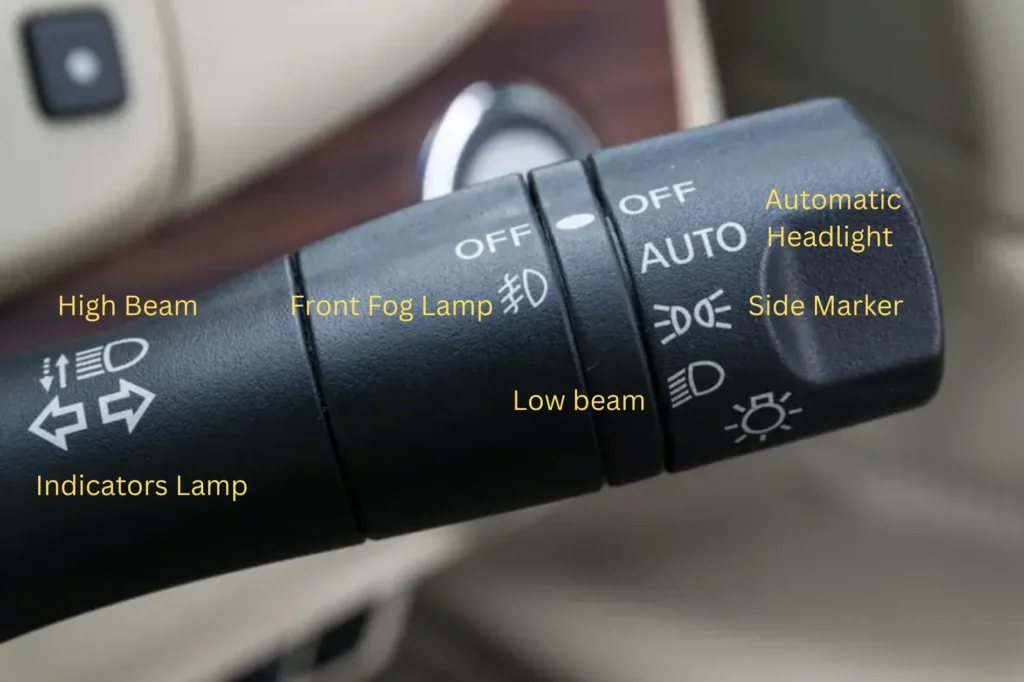
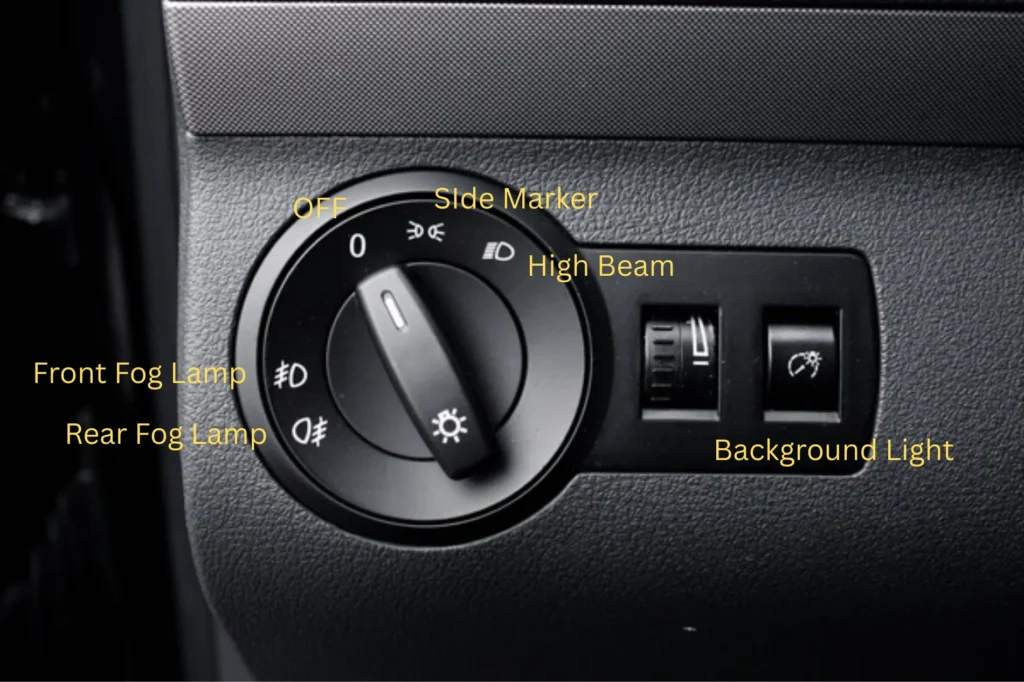
To turn on your car headlights, rotate the dial on the dashboard—usually left of the steering wheel—to the headlamp icon, or press the light-control button. Most modern cars also offer an AUTO setting for dusk activation.
Some vehicles use rotating knobs, while most still rely on stalk controls. Lights are among the most frequently used features while driving, but for beginners, understanding car light symbols is actually simple.
Headlight controls usually have two main locations: European cars place them on the dashboard left of the steering wheel, while Japanese and Korean cars mainly use the left stalk. Next, we’ll explain in detail how to operate your car’s lights.
How to operate your high/low beam:
So, how do you use high and low beam headlights? On most cars, the switch only shows the “low beam” position. Turn the light control knob or stalk to this position, and the low beams turn on. The same applies to rotary switches—just twist to the low beam setting.
Now, how to turn on high beams? Whether it’s a stalk or rotary control, high beams are always operated by pushing or pulling the stalk. Push it forward (toward the engine bay) to keep high beams on; pull it back one step to return to low beams; pull it toward yourself for a temporary flash. Note: high beams only work when low beams are already on, except for the flash function.
Read More: Low Beam VS High Beam: Everything You Need To Know
How to Turn On Your Fog light?
Fog lights are divided into front fog lights and rear fog lights, and to turn on the fog lights, you must first switch on the parking lights. Since different car models have varying designs and control layouts, the method to turn on fog lights also differs. Here are some common ways:
- Stalk with rotary knob:
Some cars have a rotary knob on the headlight stalk. Turn it forward to switch on the front fog lights, and backward to switch on the rear fog lights.
- Button with icon:
Some cars use buttons, usually located to the left and behind the steering wheel.
- Combined buttons:
In some models, the rear fog light is a button on the dashboard, while the front fog light is controlled by a rotary knob on the headlight stalk. Turn it forward to activate the front fog light.
- Rotary pull-out type:
Mostly found in German cars like Volkswagen. The headlight switch is a large rotary knob that must be pulled out and then turned to the fog light position to activate it.
This type is less universal and mainly used in VW series, so if you drive a Volkswagen, it’s worth learning carefully.
How to turn on/off car turn signals (blinkers)?
Using your car’s turn signal lights is simple and important for safe driving.
First, locate the signal lever, usually found on the left side of the steering wheel. To signal a left turn, push the lever down until it clicks into place.
To signal a right turn, push the lever upward. The corresponding arrow indicator will flash on your dashboard, confirming the signal is active.
Once you complete your turn, the lever typically returns to its neutral position automatically. If it doesn’t, gently move it back yourself. Always signal in advance to alert other drivers of your intentions.
How to Turn On Your Parking Lights
Parking lights are designed to make your vehicle more visible when stopped or parked.
To turn them on, first locate the headlight control switch, usually found on the dashboard or the turn-signal lever. Rotate or move the switch to the first position; this activates the parking lights without turning on the full headlights.
You’ll notice small lights at the front and rear of your car illuminate. Always use parking lights when required for safety or local traffic regulations.
Automatic headlights won’t leave parking lights on, as they only control the dipped beams. You’ll need to set this yourself.
Conclusion
Understanding car headlight symbols is essential for safe and confident driving. By knowing what each symbol means, you can easily adjust your lights for different road conditions, avoid mistakes, and ensure better visibility for yourself and others. Mastering these indicators not only keeps you safe but also helps extend the life of your lighting system.
For a deeper look at other lighting features in your vehicle, check out our guide on 8 Types of Car Lights and Their Functions Explained